


Know what needs to be done, instantly.
Know what needs to be done, instantly.
Know what needs to be done, instantly.
The Problem
The Problem
Sending a document for signature sounds simple. But workflows don’t break while signing. They break after sending.
Sending a document for signature sounds simple. But workflows don’t break while signing. They break after sending.
But in reality, workflows break after sending:
But in reality, workflows break after sending:
Senders lose visibility
Recipients hesitate or delay
Documents get stuck without clarity
No clear sense of what needs action
Senders lose visibility
Recipients hesitate or delay
Documents get stuck without clarity
No clear sense of what needs action
Users constantly ask:
Users constantly ask:
• What needs my attention?
• Who is blocking this document?
• Is this still valid?
The Hidden Complexity
The Hidden Complexity
At first glance, the requirement was simple:
At first glance, the requirement was simple:
| Upload → Send → Sign
| Upload → Send → Sign
But document execution is actually a system involving:
But document execution is actually a system involving:
• Multiple users (sender, recipients)
• Multiple states (sent, signed, expired...)
• Multiple outcomes (completed, delayed, failed)
Defining the System
Defining the System
The initial challenge wasn’t UI.
The initial challenge wasn’t UI.
It was ambiguity.
It was ambiguity.
There was no clear structure for:
There was no clear structure for:
• States
• Ownership
• Actions
So I defined the system around three core layers:
So I defined the system around three core layers:
• State: What has happened
• Action: What needs to happen
• Intent: Why it matters
This became the foundation for every design decision.
This became the foundation for every design decision.
State
State
State
Action
Action
Action
Intent
Intent
Intent
A System for Decision Making
A System for Decision Making
To reduce friction, I introduced a decision layer:
To reduce friction, I introduced a decision layer:
• Need Your Action
• Waiting on Others
• Expiring Shortly
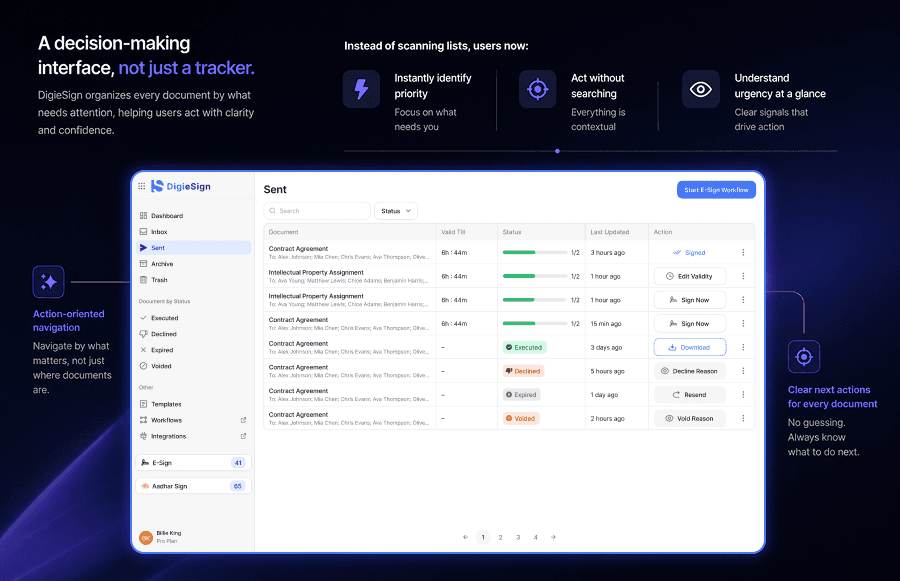
Instead of scanning lists, users now:
Instead of scanning lists, users now:
• Instantly identify priority
• Act without searching
• Understand urgency at a glance
DigieSign shifted from a tracking tool to a decision-making interface
DigieSign shifted from a tracking tool to a decision-making interface
Structuring the State System
Structuring the State System
Documents move through clearly defined states:
Documents move through clearly defined states:
• Inbox
• Sent
• Executed
• Declined
• Expired
• Voided
• Archive
• Trash
Each state answers:
Each state answers:
• Can I act on this?
• Is it complete?
• Does it need intervention?
This ensures:
This ensures:
| No document is ever lost, stuck, or unclear.
| No document is ever lost, stuck, or unclear.
Reducing Cognitive Load with Flow Section
Reducing Cognitive Load with Flow Section
Not every user has the same intent.
Not every user has the same intent.
Instead of forcing a single flow, I introduced:
Instead of forcing a single flow, I introduced:
• Multiple Signatories
• Send Envelope
• I am the Only Signer
This allows users to:
This allows users to:
• Enter with Clarity
• Avoid unnecessary steps
• Move faster toward completion
Clarity before configuration.
Clarity before configuration.
Structuring the Sending Experience
Structuring the Sending Experience
Not every user has the same intent.
Not every user has the same intent.
The sending flow was designed as a guided sequence:
The sending flow was designed as a guided sequence:
• Upload Documents
• Add Recipients
• Place Fields
• Preview & Send
With:
With:
• Built-in validations
• Clear field ownership
• Signing order visibility
Result:
Result:
| Errors are prevented before sending, not discovered after.
| Errors are prevented before sending, not discovered after.
Designing for Recipients
Designing for Recipients
The recipient experience needed to be frictionless.
The recipient experience needed to be frictionless.
The goal:
The goal:
| Open → Understand → Act → Complete
So the system focuses on:
So the system focuses on:
• Clear call-to-action
• Visible fields
• Minimal steps
• No confusion
Because even small friction can stop completion.
Because even small friction can stop completion.
Designing for Failures & Delays
Documents don’t always complete.
Instead of hiding failures, the system handles:
• Declined
• Expired
• Voided
With:
• Clear states
• Visible labels
• Defined outcomes
Failures are:
| Visible, not silent.
Design Decisions that shaped the System
Design Decisions that shaped the System
While designing DigieSign, one of the key challenges was not just showing information, but making it actionable.
Early on, I explored organizing documents purely based on their status. While this made information visible, it didn’t help users decide what to do next. Users still had to scan through lists and figure out where to act.
To solve this, I shifted the system toward action-based grouping, where documents are organized around what needs attention.
Another challenge was handling different types of use cases within a single flow. A unified flow initially seemed flexible, but it increased cognitive load and slowed users down. This led to introducing intent-based entry points, allowing users to choose how they want to proceed from the start.
Finally, giving users too much flexibility in configuration resulted in frequent errors during setup. Instead of leaving everything open-ended, I structured the flow into guided steps with validations, ensuring that documents are correctly set up before being sent.
These decisions helped transform DigieSign from a system that displays information into one that actively guides users toward completion.
Conclusion
DigieSign was designed to bring clarity to document execution by answering three simple questions at every stage — what is the current state of the document, what needs to happen next, and who is responsible for it.
To achieve this, I defined a clear state system, structured the interface around actions instead of just information, and designed guided workflows that reduce errors during setup.
As a result, users no longer have to interpret or search for what to do next. The system makes it obvious, ensuring documents move forward without getting stuck or lost in the process.
Know what needs to be done, instantly.
The Problem
Sending a document for signature sounds simple. But workflows don’t break while signing. They break after sending.
But in reality, workflows break after sending:
Senders lose visibility
Recipients hesitate or delay
Documents get stuck without clarity
No clear sense of what needs action
Senders lose visibility
Recipients hesitate or delay
Documents get stuck without clarity
No clear sense of what needs action
Users constantly ask:
• What needs my attention?
• Who is blocking this document?
• Is this still valid?
The Hidden Complexity
At first glance, the requirement was simple:
| Upload → Send → Sign
But document execution is actually a system involving:
• Multiple users (sender, recipients)
• Multiple states (sent, signed, expired...)
• Multiple outcomes (completed, delayed, failed)
Defining the System
The initial challenge wasn’t UI.
It was ambiguity.
There was no clear structure for:
• States
• Ownership
• Actions
So I defined the system around three core layers:
• State: What has happened
• Action: What needs to happen
• Intent: Why it matters
This became the foundation for every design decision.
State
Action
Intent
A System for Decision Making
To reduce friction, I introduced a decision layer:
• Need Your Action
• Waiting on Others
• Expiring Shortly
Instead of scanning lists, users now:
• Instantly identify priority
• Act without searching
• Understand urgency at a glance
DigieSign shifted from a tracking tool to a decision-making interface
Structuring the State System
Documents move through clearly defined states:
• Inbox
• Sent
• Executed
• Declined
• Expired
• Voided
• Archive
• Trash
Each state answers:
• Can I act on this?
• Is it complete?
• Does it need intervention?
This ensures:
| No document is ever lost, stuck, or unclear.
Reducing Cognitive Load with Flow Section
Not every user has the same intent.
Instead of forcing a single flow, I introduced:
• Multiple Signatories
• Send Envelope
• I am the Only Signer
This allows users to:
• Enter with Clarity
• Avoid unnecessary steps
• Move faster toward completion
Clarity before configuration.
Structuring the Sending Experience
Not every user has the same intent.
The sending flow was designed as a guided sequence:
• Upload Documents
• Add Recipients
• Place Fields
• Preview & Send
With:
• Built-in validations
• Clear field ownership
• Signing order visibility
Result:
| Errors are prevented before sending, not discovered after.
Designing for Recipients
The recipient experience needed to be frictionless.
The goal:
| Open → Understand → Act → Complete
So the system focuses on:
• Clear call-to-action
• Visible fields
• Minimal steps
• No confusion
Because even small friction can stop completion.
Designing for Failures & Delays
Documents don’t always complete.
Instead of hiding failures, the system handles:
• Declined
• Expired
• Voided
With:
• Clear states
• Visible labels
• Defined outcomes
Failures are:
| Visible, not silent.
Design Decisions that shaped the System
While designing DigieSign, one of the key challenges was not just showing information, but making it actionable.
Early on, I explored organizing documents purely based on their status. While this made information visible, it didn’t help users decide what to do next. Users still had to scan through lists and figure out where to act.
To solve this, I shifted the system toward action-based grouping, where documents are organized around what needs attention.
Another challenge was handling different types of use cases within a single flow. A unified flow initially seemed flexible, but it increased cognitive load and slowed users down. This led to introducing intent-based entry points, allowing users to choose how they want to proceed from the start.
Finally, giving users too much flexibility in configuration resulted in frequent errors during setup. Instead of leaving everything open-ended, I structured the flow into guided steps with validations, ensuring that documents are correctly set up before being sent.
These decisions helped transform DigieSign from a system that displays information into one that actively guides users toward completion.
Conclusion
DigieSign was designed to bring clarity to document execution by answering three simple questions at every stage — what is the current state of the document, what needs to happen next, and who is responsible for it.
To achieve this, I defined a clear state system, structured the interface around actions instead of just information, and designed guided workflows that reduce errors during setup.
As a result, users no longer have to interpret or search for what to do next. The system makes it obvious, ensuring documents move forward without getting stuck or lost in the process.